The first step in adjusting system level is to review each component's owner's manual to make sure you fully understand the unit's nuances. Then set the bass, treble, balance, and fader controls on the head unit to the "flat" position and its volume control to its minimum position. If a preamplifier is in the chain, set its input-sensitivity controls for minimum gain, which is accomplished by rotating the trim pots (usually on the rear or bottom of the unit) counterclockwise; in addition, set the preamp's volume control to minimum. If an equalizer is being used, set its input-sensitivity controls for minimum gain. Then set each of its frequency controls to the maximum "boost" position – doing so allows room for adjusting the EQ later. (If the level of each frequency control is left in its "flat" position, clipping will occur whenever the listener boosts one or more frequency band.) If an active crossover is being used, set its input-sensitivity controls to minimum; if the component has output-level trim pots, set them for three-quarters volume. Finally, set the input-sensitivity controls on the amplifier(s) for minimum gain.
Once these preliminary adjustments have been made, turn the system on and play a tape or disc that you're familiar with. Then set the volume control on the head unit for three-quarters volume. Don't worry if you don't hear the music at this time – all this means is that the minimum-gain settings previously made are too low to drive the speakers. To bring system output up to an audible level, turn up the input- and output-level controls on each of the remaining signal processors and amplifiers to half volume; you should now have a moderate output level. If you have a preamplifier, turn its volume control to three-quarters volume. If the unit has clipping indicators (usually in the form of red LED's), simply turn the input-sensitivity controls up until the LED's begin to wink on and off; when this occurs, the preamp has reached its maximum output and any further increase in signal level will cause clipping.
If there are no clipping indicators, you'll have to set the input levels by ear. Slowly turn the input-sensitivity controls on the preamp clockwise. As you do this, decrease the input sensitivity of the signal processor or amplifier that's next in the signal path; the idea is to keep system volume at a moderate level. Continue this "back and forth" action until the sound becomes distorted or fuzzy. When this happens, you have driven the preamp into clipping; slowly back its input-sensitivity controls down until the sound is clean.
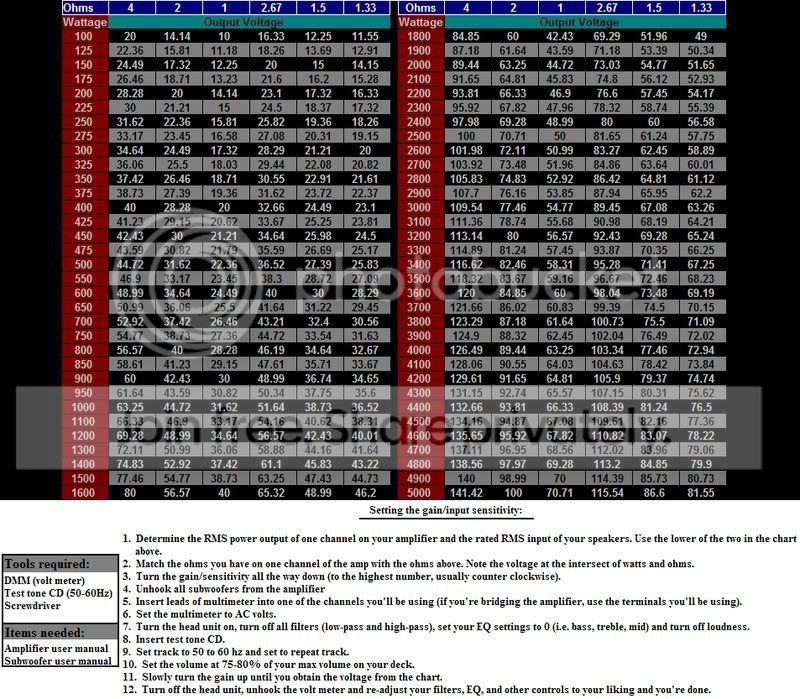
Follow the above procedure to set input levels for the equalizer and active crossover (if your system has these components and they have input-sensitivity controls). The final step in setting system signal levels is to adjust the input sensitivity of each amplifier. Proceed by slowly increasing the input controls until the speakers powered by that amp begin to sound fuzzy. Then slowly nudge back the controls until the distortion disappears. If a signal processor in the chain doesn't have input-sensitivity controls, don't worry – simply skip it and proceed to the next device. Chances are that the component sports a "unity-gain design," which means its output level is approximately the same as its input level.