Need help matching subs with an amp

sleeper4bngr

Well-Known Member
Joined
Aug 20, 2006
Posts
94
Reaction score
0
Location
Tampa Fl
a noob wouldn't know how to use that sub to it's potential

type r's are very noob friendly since they get VERY loud and sound somewhat decent

Yea I am a noob and plan on running a system and researching more before i start spending big money on something that's really gonna bump. I'm sure I'm gonna wana build up my system in the long run but for now, I already have the subs and wiring so i just wana pick up an amp that will be sufficient for now and be able to be used later when I do go bigger. Im just not looking to spend all the money to completely outfit my system. I more would like to know if I can purchase a larger capacity mono sub and use it on those subs or will running the amp at such low load actually be damaging for it in the long run?
 

sleeper4bngr

Well-Known Member
Joined
Aug 20, 2006
Posts
94
Reaction score
0
Location
Tampa Fl
I have one more question for you guys. I'm gonna wire my 2 subs parallel to the mono sub. So since they are both SVC 4ohm then the amp will treat them as 2 ohm correct? Now do I power the amp down to around 100w (the rms wattage of each sub) or do I combine the power of the 2 subs and power the amp to around 200w?
 
Last edited:

eggyhustles

Well-Known Member
Joined
Aug 9, 2008
Posts
703
Reaction score
2
Location
tri-state
Yes the final ohm load would be 2 ohms. combine the power and leave some headroom. i'd set the gains to around 300-350.

next sub you get, make sure it's a dual 2 ohm so it can be wired to 1 ohm
 

sleeper4bngr

Well-Known Member
Joined
Aug 20, 2006
Posts
94
Reaction score
0
Location
Tampa Fl
Eggy man u seem to answer all my questions and predict everything I plan on doing lol. But tell me why would u set the amp so high at 300? thats about 100 over the combined rms wattage of the 2 subs? Won't I have to worry about the subs blowing or clipping?
 

eggyhustles

Well-Known Member
Joined
Aug 9, 2008
Posts
703
Reaction score
2
Location
tri-state
Clipping happens when u jack up the gains to make up for power you don't have. that's won't be the case with the sundown amp since it does 600@ 2 ohms. most subs can take a bit more over rated power and some can take alot more. the extra 50-60 going to each sub shouldn't drive them past their thermal limit.

another example would be the alpine type r which is rated @ 500...that sub can take around 800-900 daily and close to 1500 on burps.
 

eggyhustles

Well-Known Member
Joined
Aug 9, 2008
Posts
703
Reaction score
2
Location
tri-state
Forgot to add that you need to buy a digital multi meter to set the gains.

here's a video that gives u brief tut
http://www.youtube.com/watch?v=xSUuBBJQ4Wk

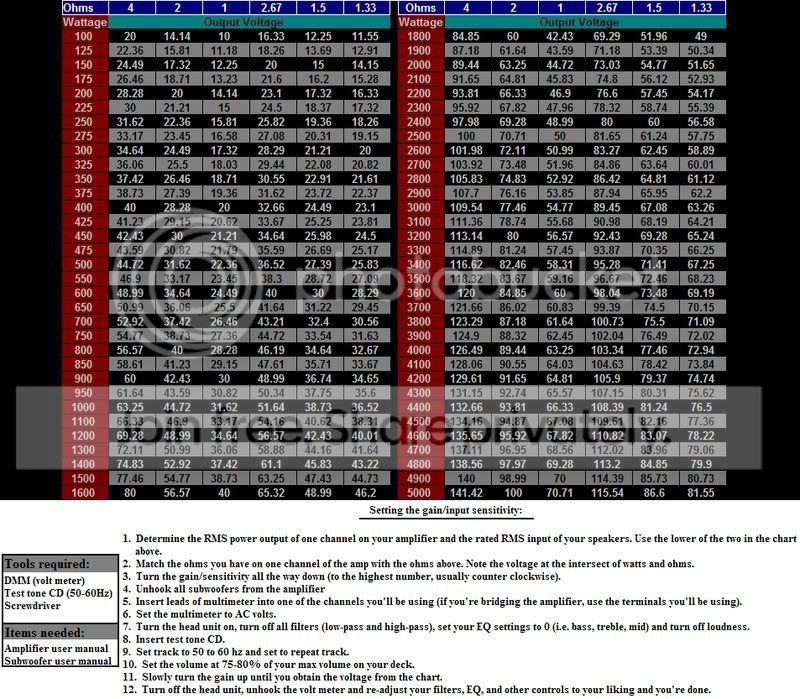
and heres a chart
rmschartpm5.jpg
 

ryan s

they dont think it
Joined
Dec 27, 2005
Posts
22,776
Reaction score
287
Location
be like it is
next sub you get, make sure it's a dual 2 ohm so it can be wired to 1 ohm
no point in running under 2 ohms. thats straight from zed audio.
Forgot to add that you need to buy a digital multi meter to set the gains.
again...no point. with that much power on tap, he probably wont have to turn the gain up much, if at all. i have one rca providing signal from a 2v headunit, branching off an external XO, into a signal processor, then into the sub amp. the gain knob is not a volume knob, but it gets obnoxiously loud at anything over about 1/5 of the way up (400w on a 350w sub, sealed).

i believe that's also straight from zed...but their site is fuxored and i cant find the pdf i want. i know that jl says to set by dmm...but i trust steve mantz a LOT more than pretty much any amp maker short of robert zeff (arc) and the like.

that also extends to people who say they can "hear" a difference with "high end" wires. anyone who claims this shouldn't be in business. thats for another thread though.

see here for a good tutorial on gain setting http://www.termpro.com/articles/levelset.html
The first step in adjusting system level is to review each component's owner's manual to make sure you fully understand the unit's nuances. Then set the bass, treble, balance, and fader controls on the head unit to the "flat" position and its volume control to its minimum position. If a preamplifier is in the chain, set its input-sensitivity controls for minimum gain, which is accomplished by rotating the trim pots (usually on the rear or bottom of the unit) counterclockwise; in addition, set the preamp's volume control to minimum. If an equalizer is being used, set its input-sensitivity controls for minimum gain. Then set each of its frequency controls to the maximum "boost" position – doing so allows room for adjusting the EQ later. (If the level of each frequency control is left in its "flat" position, clipping will occur whenever the listener boosts one or more frequency band.) If an active crossover is being used, set its input-sensitivity controls to minimum; if the component has output-level trim pots, set them for three-quarters volume. Finally, set the input-sensitivity controls on the amplifier(s) for minimum gain.

Once these preliminary adjustments have been made, turn the system on and play a tape or disc that you're familiar with. Then set the volume control on the head unit for three-quarters volume. Don't worry if you don't hear the music at this time – all this means is that the minimum-gain settings previously made are too low to drive the speakers. To bring system output up to an audible level, turn up the input- and output-level controls on each of the remaining signal processors and amplifiers to half volume; you should now have a moderate output level. If you have a preamplifier, turn its volume control to three-quarters volume. If the unit has clipping indicators (usually in the form of red LED's), simply turn the input-sensitivity controls up until the LED's begin to wink on and off; when this occurs, the preamp has reached its maximum output and any further increase in signal level will cause clipping.

If there are no clipping indicators, you'll have to set the input levels by ear. Slowly turn the input-sensitivity controls on the preamp clockwise. As you do this, decrease the input sensitivity of the signal processor or amplifier that's next in the signal path; the idea is to keep system volume at a moderate level. Continue this "back and forth" action until the sound becomes distorted or fuzzy. When this happens, you have driven the preamp into clipping; slowly back its input-sensitivity controls down until the sound is clean.

Follow the above procedure to set input levels for the equalizer and active crossover (if your system has these components and they have input-sensitivity controls). The final step in setting system signal levels is to adjust the input sensitivity of each amplifier. Proceed by slowly increasing the input controls until the speakers powered by that amp begin to sound fuzzy. Then slowly nudge back the controls until the distortion disappears. If a signal processor in the chain doesn't have input-sensitivity controls, don't worry – simply skip it and proceed to the next device. Chances are that the component sports a "unity-gain design," which means its output level is approximately the same as its input level.


setting gains via test tones is nice if you only listen to test tones. ONLY way i'd set gains with em is if i had access to a genuine RTA :coffee:
 
Last edited:
Back
Top